
Cool composite photo of planes taking off
Cool composite photo of planes taking off from a busy airport. (via nickbaum)

This site is made possible by member support. 💞
Big thanks to Arcustech for hosting the site and offering amazing tech support.
When you buy through links on kottke.org, I may earn an affiliate commission. Thanks for supporting the site!
kottke.org. home of fine hypertext products since 1998.
Beloved by 86.47% of the web.
Cool composite photo of planes taking off from a busy airport. (via nickbaum)
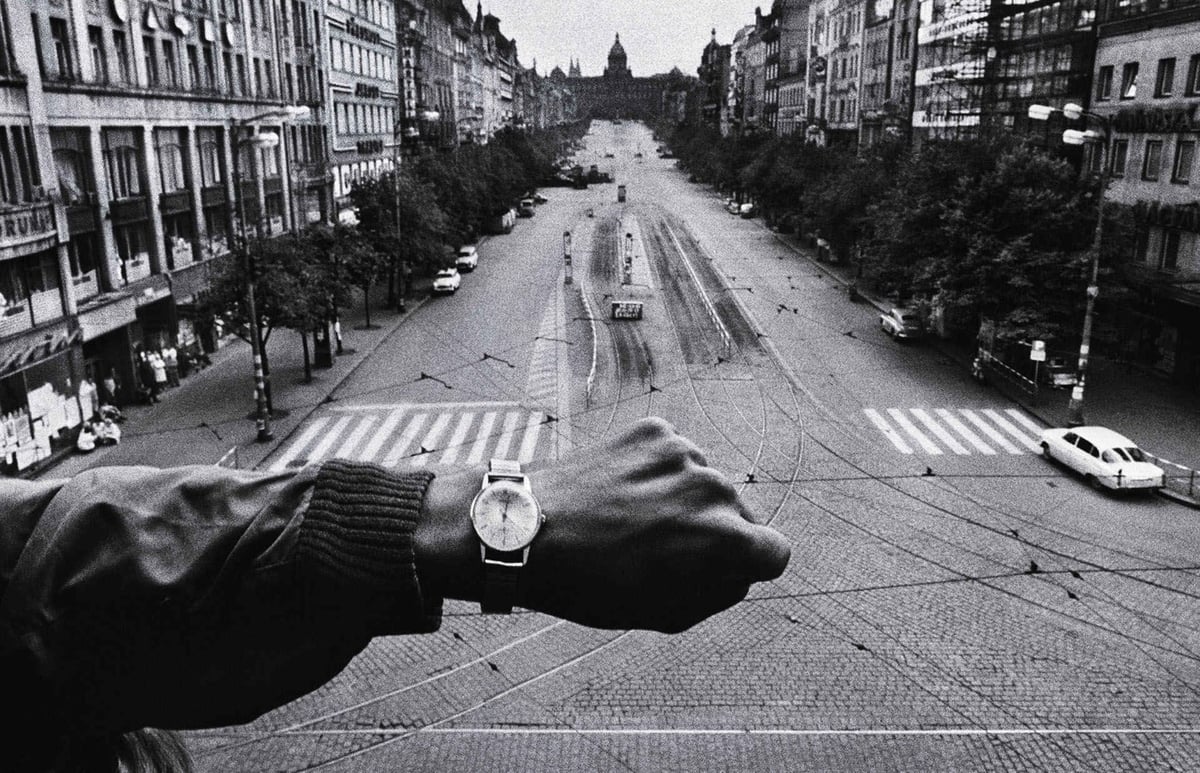
This is one of my favorite photos. It was taken by Josef Koudelka in Prague in 1968, just before the Soviet Union invaded and put a stop to The Prague Spring. To demonstrate the emptiness of the streets at noon, Koudelka stuck his wristwatch into the scene before shooting it. A simple, brilliant gesture that adds not only a temporal dimension to the photo but also a sense of solitary humanity in contrast to the empty streets.
Little People is a series of photographs of tiny handpainted people depicted in different situations around London. Reminds me of the tiny people with food photos of Akiko Ida and Pierre Javelle. It would be neat to monkey with the depth of field in these photos so that somehow both the little people and the background were in focus, making it seem more like the people weren’t little.
Photo of Beavis, a homeless man living in San Francisco, shooting up (perhaps NSFW). He was previously photographed in 1994 as a street kid in LA for Time magazine. “he picks his scabs to find a good spot; and tries a few locations before he gets a vein.”
Who loves you? I love you and JPG Magazine loves you. For a limited time, if you use the KOTTKED code, you get $5 off a year’s subscription to JPG Magazine, “The Magazine of Brave New Photography”.
Photographs of postcards and miniature souvenirs held in place of actual landmarks and tourist attractions. (via gulfstream)
Top 100 photos taken by the Hubble Space Telescope, a singularly talented photographer.
“The Polling Place Photo Project is a nationwide experiment in citizen journalism that seeks to empower citizens to capture, post and share photographs of democracy in action. By documenting their local voting experience on November 7, voters can contribute to an archive of photographs that captures the richness and complexity of voting in America.”
Opening tonight at Jen Bekman’s gallery: James Deavin’s Photographs from the New World, a selection of photos he took in the online game, Second Life.
Great photos of the Space Shuttle launch taken from the International Space Station. (via cyn-c)
Update: The photos weren’t taken from the ISS but from a chase plane. (thx, greg)
Time’s White House photographers have a daily photoblog. A good look at the stuff that doesn’t make it into the newspapers or magazines. (thx, pablo)
Artist Liz Cohen fixes up old cars and then photographs herself with them as a bikini model. Here’s a recent article on Cohen’s work in the Phoenix New Times and an older article from Wired. (via art fag city)
Photographer Clifford Ross shared his list of the necessary ingredients for invention and art at PopTech:
1. curiousity
2. persistence
3. ready to embrace the unexpected
4. ability and willingness to collaborate
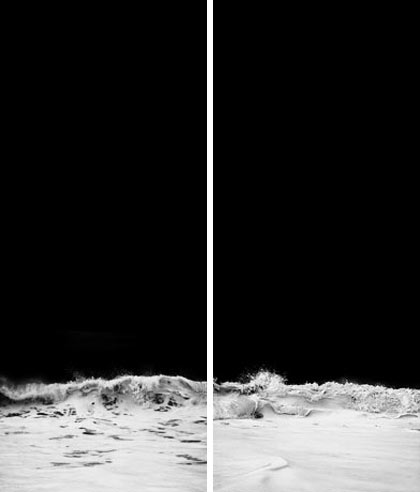
Ross showed some rough results from his new pano-camera. I love Ross’ Hurricane series:
Photographer Philippe Halsman took portraits of people while jumping (the people, not Halsman), as a way to loosen up. Subjects include Marilyn Monroe, Richard Nixon, and the Dule and Duchess of Windsor. (viabb)
Slideshow of photographs from the last show (+ archival photos) at CBGB, a beloved New York music venue. Several photos of the club’s final days are available on Flickr as well.
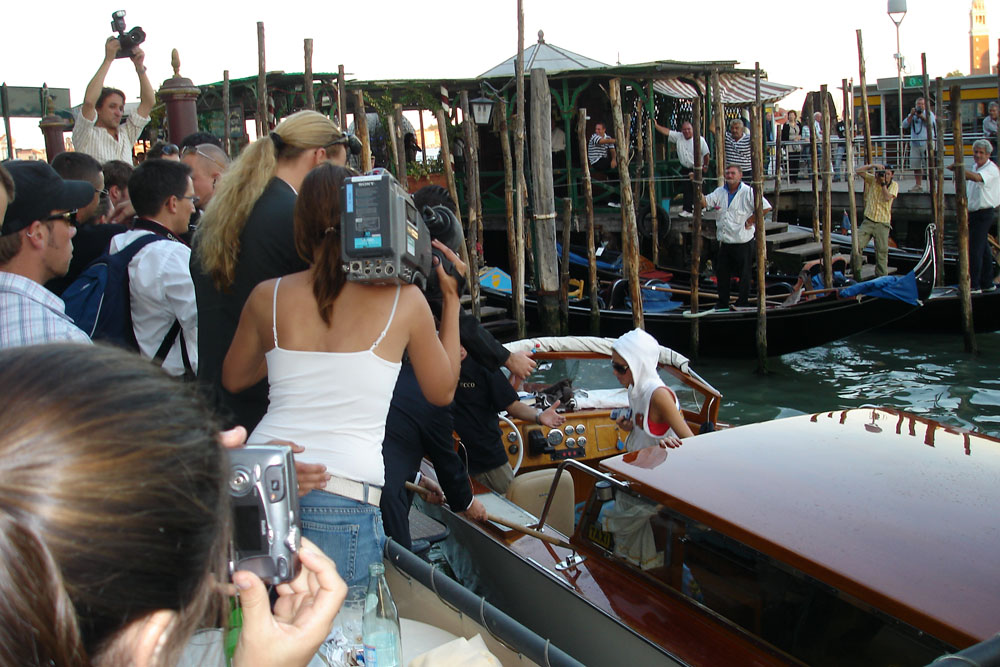
The future of science: celebrity photography. While in Venice for the World Conference on the Future of Science, prominent philosopher Daniel Dennett squeezed off a shot of Paris Hilton arriving at the hotel for, one would assume, activities unrelated to the scientific proceedings.
Photographer Francois Brunelle is looking for people and their doppelgangers to photograph for a project. Whaddya say, Sweeney? (via bb)
Pruned takes us on a short tour of grain elevators. Wonderful old industrial buildings…the small town I grew up in had a huge grain elevator rising from the center of town, like a skyscraper in a cornfield.
Stephen Berkman makes 1860s-style photographs (more specifically, ambrotypes) with a contemporary eye. (via enthusiasm)
Photographs from Kevin Tiell of pinballs, up close and personal. This one’s my favorite. (via bb)
Youngna Park has a short wrap-up of going to see Annie Leibovitz speak about her new book, A Photographer’s Life: 1990-2005. “And, so it goes, said Leibovitz, that some of us use words in order to take good pictures, and some of us take pictures, in order that we can be heard.”
Portrait photographer Platon shares some remembrances of shooting famous people. “Bono told Platon that ‘a friend’ had made the rosary he wears. Which friend? Oh, the Pope, of course.” Here’s another interview with Platon. (via conscientious)
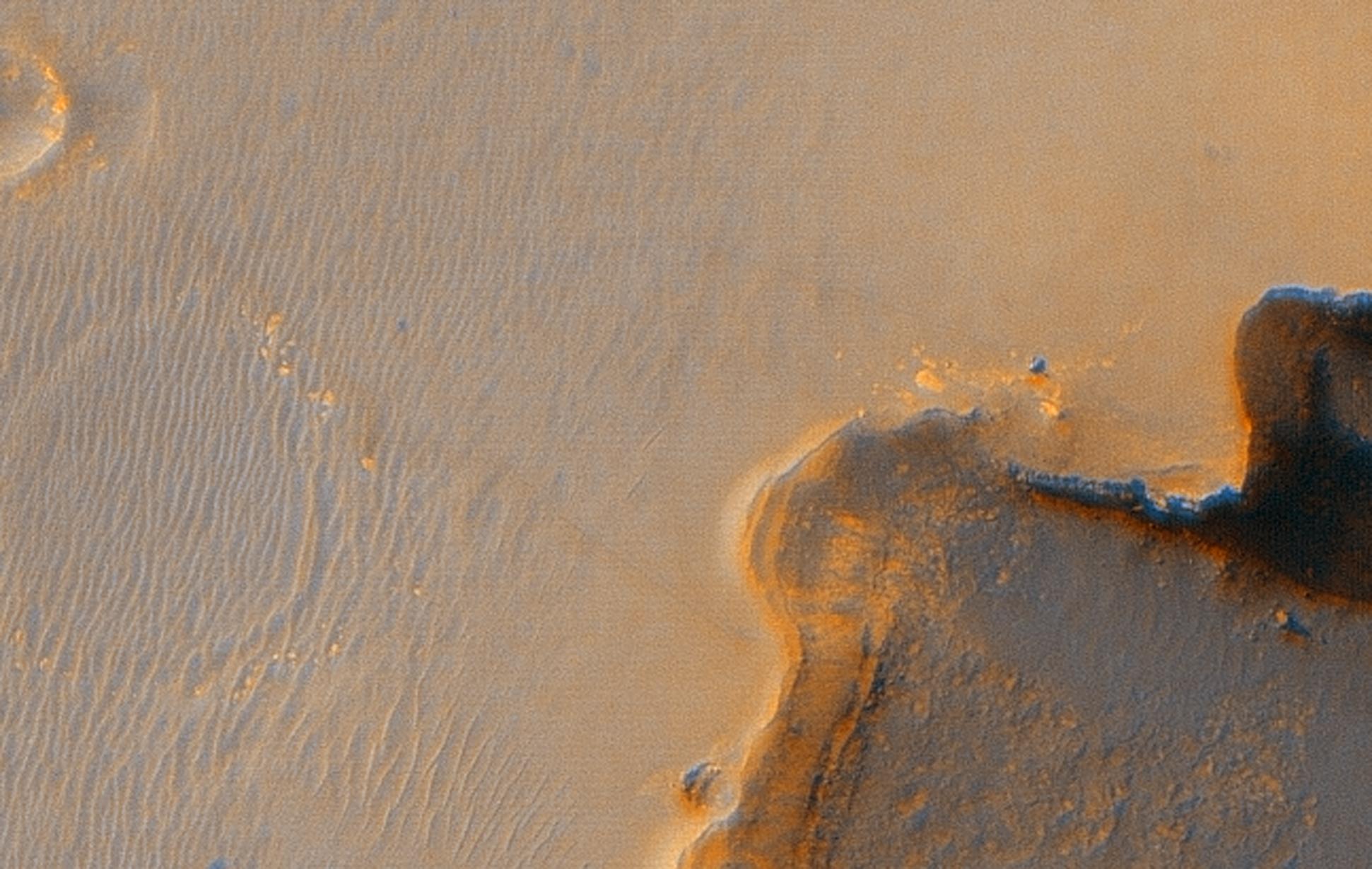
Mars Reconnaissance Orbiter recently snapped a picture of the Opportunity rover perched on the rim of Victoria Crater. Opportunity drove more than 5 miles from its landing site to get there. High resolution photo here. Here’s where Opportunity is located on Mars.
Instead of megapixels-worth of light sensors, a new experimental camera uses a series of mirrors to focus all the light on just one sensor. Somewhat related question that I’ve been wondering about for awhile: why do digital cameras need shutters? Why can’t you just turn the sensors on and off electronically? Seems like you could then use many more arbitrary “shutter” speeds, like 5 seconds or 1/50000 of a second.
Museum camouflage photographs by Harvey Opgenorth. (via nick baum)
Some nice photography from Corey Arnold, specifically the fishing portfolios. (via thih)
Nikon recently sent a bunch of new D80s to some Flickr photographers and are now using some of the shots those photographers took in an ad campaign. “Nikon did what every major brand should be doing…it got out of its own way and let the real people that counted do the talking: their own consumers.” PDF of the ad spread.
LifePixel will modify your digital camera (Nikons or Canons, mostly) to shoot in infrared. “Camera manufacturers stop infrared light from contaminating the images by placing a hot mirror filter in front of the sensor which effectively blocks the infrared part of the spectrum while still allowing the visible light to pass. We remove this hot mirror filter and replace it with a custom manufactured infrared filter.”
Socials & More