
The Photoshop Disasters blog catalogs missteps in photo retouching and graphic design. The most recent post shows the cover of a Nintendo DS game that has an embarrassingly invisible iStockPhoto watermark on it. The three-handed lady is my favorite.

Advertise here with Carbon Ads
This site is made possible by member support. 💞
Big thanks to Arcustech for hosting the site and offering amazing tech support.
When you buy through links on kottke.org, I may earn an affiliate commission. Thanks for supporting the site!
kottke.org. home of fine hypertext products since 1998.
Beloved by 86.47% of the web.
kottke.org posts about Photoshop
These half-n-half celebrity face mashups are unsettling. “
These half-n-half celebrity face mashups are unsettling. “The right half of a face has to be from one celebrity and the left half from another.” The Bill/Hillary and the Cruise/Holmes ones are especially good.
Photoshopped series of photos of people kissing themselves. Sort of disturbingly erotic, in an erotically disturbing way.
Clever technique for pinching the colors from famous paintings using the Match Color tool in Photoshop. “The Old Masters of painting spent years of their lives learning about color. Why let all their effort go to waste on the walls of some museum when it could be used to give you a hand with color correction?”
Odd games
Over the holidays, Mike Monteiro discovered there was a Nacho Libre game for the Nintendo DS. Thinking that an arbitrary choice for a movie tie-in game, he started the DS Tie-In Games I Wanna Play group on Flickr to showcase other possible odd media tie-ins for the DS. Some of my favorite submissions so far include: The Passion of the Christ, Birth of a Nation, Empire, Remains of the Day, My Dinner with Andre (Bon Mot controller sold separately), Super Mario Bros, Learning GNU Emacs, Requiem for a Dream, The Cremaster Cycle, and Getting Things Done.
Here’s a couple of ones that I’ve done: Dancer in the Dark and The New Yorker Draw Your Own Cover Electronic Entertainment (with noncompulsory coöperative mode), pictured below.
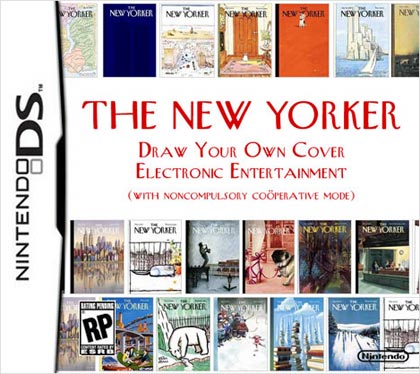
If you join the group, there’s a Photoshop kit you can download to join in the fun.
It’s fun Fotoshop Friday! (Phun Photoshop Phriday?) Anyway, here’s a bunch of pictures of celebrities Photoshopped to look like Star Wars characters. I’m surprised there weren’t more celebrities frozen in carbonite. (via fandumb)
A collection of two-minute Photoshop tricks, delivered via text, audio, and video.
Tutorial on adding surprisingly realistic beards to people with Photoshop. (via photojojo, who’s having a contest for the best bearded woman)
Mill City panorama, take 1
Here’s my first attempt at a panorama of the Mill City Museum and the surrounding area:

Here’s a larger version (3000 x 912, 312 KB).
I’m not entirely satisfied with this version. I used a shareware program for OS X called DoubleTake to stitch the images together and it’s not suited for this kind of scene. Too much of the image turned out blurry & fuzzy and you have little control over which pieces of the image take precedent over the others. Some of this was probably user error and on some parts of the image (when there were less pieces involved), it did a wonderful job. I’m going to stitch a version in Photoshop by hand (and put a black background behind it) to see how it compares.
Update: Lots of photo stitching suggestions from people. Jake turned me onto Autostitch a few weeks ago, but alas it’s not available for the Mac, nor do I have one of those fancy MacBooks on which to run Parallels. Calico is an OS X app that uses the Autostitch code, I may check that out. Photoshop CS has a built-in Photomerge tool that does panoramas. Hugin is a GPLed image stitcher that works on Windows and OS X. (thx galen, dan, jake, arlo, joe, glen, jason, and nicholas)
Pictures of celebrities photoshopped to look like senior citizens. Some of them are amazing.
How to fix photos that are too dark or too light with Photoshop. Color range + levels is your friend.
Socials & More