The easy single-handed operation of the iPhone1 is not one of its obvious selling points but is one of those little features that grows on you and becomes nearly indispensable. A portable networked computing and gaming device that can be easily operated with one hand can be used in a surprising variety of situations.
Eating is the most obvious potentially one-handed activity most of us engage in. If you must do something other than just enjoy your food ferchristsake, you can answer emails, read Twitter, or catch up on the latest at nytimes.com while munching on that salad.
People carry things. Coffee, shopping bags, books, bags, babies, small dogs, hot dogs, water bottles, coats, etc. It’s nice to be able to not put all that crap down just to quickly Google for the closest public restroom (aka Starbucks).
It is very occasionally necessary to use the iPhone while driving. No, not for checking your stock portfolio, you asshole. For directions. Glance quickly and keep your thoughts on the road ahead.
My wife spends about five hours a day breastfeeding our daughter and has only one hand available for non-feeding activities. That hand is frequently occupied by her iPhone; it helps her keep abreast (hey’o!) of current events, stay connected with pals through Twitter & email, track feeding/sleeping/diaper changing times, keep notes (she plans meals and grocery “shops” at 3am), and alert her layabout husband via SMS to come and get the damned baby already.
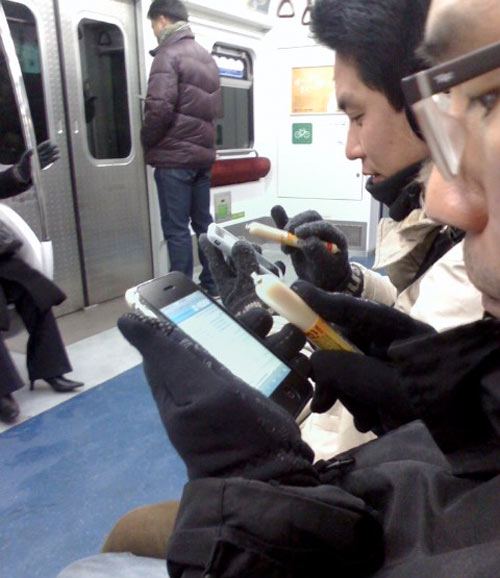
Straphangers in NYC and elsewhere know what a great one-handed device the iPhone is. Riding the subway and reading has never been so easy, especially during rush hour when pointy hardcovers become weaponized. (Getting shived by a hardbound Harry Potter on the 6pm 5 train is no joke.)
Tim Carmody, one of the shopkeeps over at Snarkmarket, recently broke his arm but is getting plenty of use out of his iPhone: “They should have an ad — ‘If you’ve got a broken arm, this is the perfect phone for you!’” Broken arms are uncommon, but plenty of people have more permanent physical conditions necessitating one-handed interaction with the world.
And a list of one-handed computing activities wouldn’t be complete without at least quickly mentioning, well, you know. It rhymes with “whacking off”. I think I’ve said enough.
Two areas where the iPhone really shines in its one-handedness are gaming and typing. One-handed gaming is pretty much impossible with the Nintendo DS or Sony PSP, but the App Store is full of games that require only your thumb for input. I’ve been playing lots of Shake & Spell and Strategery lately. Typing with one hand on the iPhone is almost as easy and fast as with two. You can actually *write* on this thing with one hand; not just SMS messages and tweets but also blog posts, emails, meeting minutes, and the like.
Update: Tim Carmody, he of the broken arm above, makes a couple of key observations about the one-handedness of the iPhone:
I think it’s fairly easy to dial and answer any cell phone with one hand. It’s the fact that you can almost perfectly use smartphone functions with a single hand that set the iPhone apart. I used to have a Blackberry Bold - it bit the dust around the same time my arm did — and while I really liked a lot of things about the hardware, you really couldn’t use it well with one hand
And:
Your cheerfulness about [being injured or handicapped] varies almost directly with your autonomy — and the iPhone is GREAT at making you feel autonomous. Innovation in interface design isn’t just about creating a cooler experience. It’s about giving more and more people a shot at that experience to begin with.
And this is exactly how I use my iPhone 95% of the time (except I am left-handed).
[1] This footnote still applies. (Yes, that was a reference to a footnote within another footnote. (And that was a parenthetical within a footnote. (…))) ↩
Update: One-handed iPhone? That’s nothing. Check out this guy using the iPhone with his feet.
I met Keith on the Red line, heading to Cambridge from Boston. We had a nerdy conversation about the new iPhone, which he swears by. He operates his with his feet because a disability limits the dexterity of his hands. He said his kid is nuts for the games on the iPhone, but that he prefers more functional aspects which would be harder for him to use on any other mobile device.
Few technology and device-making companies probably realize it, but they are in direct competition with Apple (or soon will be). How did this happen? Well, the iPhone1 does a lot of useful things pretty well, well enough that it is replacing several specialized devices that do one or two things really well. Space in backpacks, pockets, and purses is a finite resource, as is money (obviously). As a result, many are opting to carry only the iPhone with them when they might have toted several devices around. Here is a short list of devices with capabilities duplicated to some degree by the iPhone:
Mobile phone - All the stuff any mobile phone does: phone calls, texting, voicemail.
PDA - The iPhone meets all of the basic PDA needs: address book, calendar, to-dos, notes, and easy data syncing.
iPod - The iPhone is a full-featured music-playing device. And with 32 GB of storage, the 3GS can handle a huge chunk of even the largest music collection.
Point and shoot camera - While not as full-featured as something like a PowerShot, the camera on the iPhone 3GS has a 3-megapxiel lens with both auto and manual focus, shoots in low-light, does macro, and can shoot video. Plus, it’s easy to instantly publish your photos online using the iPhone’s networking capabilities and automatically tag your photos with your location.
Personal computer - With the increased speed of the iPhone 3GS, the 3G and wifi networking, a real web browser, and the wide array of available apps at the App Store, many people find themselves leaving the laptops at home and using the iPhone as their main computer when they are out and about.
Nintendo DS or PSP - There are thousands of games available at the App Store and if the folks in my office and on the NYC subway are any indication, people are using their iPhones as serious on-the-go gaming machines.
GPS - With geolocation by GPS, wifi, or cell tower, the Google Maps app, and the built-in compass, the iPhone is a powerful wayfinding device. Apps can provide turn by turn directions, current traffic conditions, satellite and photographic street views, transit information, and you can search for addresses and businesses.
Flip video camera - The iPhone 3GS doesn’t shoot in HD (yet), but the video capabilities on the phone are quite good, especially the on-phone editing and easy sharing.
Compass - Serious hikers and campers wouldn’t want to rely on a battery-powered device as their only compass, but the built-in compass on the iPhone 3GS is perfect for casual wayfinding.
Watch - I use the clock on my iPhone more often than any other function. By far.
Portable DVD player - Widescreen video looks great on the iPhone, you can d/l videos and TV shows from the iTunes Store, and with apps like Handbrake, it’s easy to rip DVDs for viewing on the iPhone.
Kindle - Amazon’s Kindle app for the iPhone is surprisingly usable. And unlike Amazon’s hardware, the iPhone can run many ebook readers that handle several different formats.
With all the apps available at the App Store, the list goes on: pedometer, tape recorder, heart monitor, calculator, remote control, USB key, and on and on. Electronic devices aren’t even the whole story. I used to carry a folding map of Manhattan (and the subway) with me wherever I went but not anymore. With Safari, Instapaper, and Amazon’s Kindle app, books and magazines aren’t necessary to provide on-the-go reading material.
Once someone has an iPhone, it is going to be tough to persuade them that they also need to spend money on and carry around a dedicated GPS device, point-and-shoot camera, or tape recorder unless they have an unusual need. But the real problem for other device manufacturers is that all of these iPhone features — particularly the always-on internet connectivity; the email, HTTP, and SMS capabilities; and the GPS/location features — can work in concert with each other to actually make better versions of the devices listed above. Like a GPS that automatically takes photos of where you are and posts them to a Flickr gallery or a video camera that’ll email videos to your mom or a portable gaming machine with access to thousands of free games over your mobile’s phone network. We tend to forget that the iPhone is still from the future in a way that most of the other devices on the list above aren’t. It will take time for device makers to make up that difference.
If these manufacturers don’t know they are in competition with the iPhone, Apple sure does. At their Rock & Roll event last week, MacWorld quotes Phil Schiller as saying:
iPod touch is also a great game machine. No multi-touch interface on other devices, games are expensive, there’s no app store, and there’s no iPod built in. Plus it’s easier to buy stuff because of the App Store on the device. Chart of game and entertainment titles available on PSP, Nintendo DS, and iPhone OS. PSP: 607. Nintendo DS: 3680. iPhone: 21,178.
The same applies to the iPhone. At the same event, Steve Jobs commented that with the new iPod nano, you essentially get a $149 Flip video camera thrown in for free:
We’re going to start off with an 8GB unit, and we’re going to lower the price from $149 to free. This is the new Apple, isn’t it? (laughter) How are we going to do that. We’re going to build a video camera into the new iPod nano. On the back of each unit is a video camera and a microphone, and there’s a speaker inside as well. Built into every iPod nano is now an awesome video camera. And yet we’ve still retained its incredibly small size.
In discussing the Kindle with David Pogue, Jobs even knocks the idea of specialized devices:
“I’m sure there will always be dedicated devices, and they may have a few advantages in doing just one thing,” he said. “But I think the general-purpose devices will win the day. Because I think people just probably aren’t willing to pay for a dedicated device.”
In terms of this competition, the iPhone at this point in its lifetime2 is analogous to the internet in the late 1990s. The internet was pretty obviously in competition with a few obvious industries at that point — like meatspace book stores — but caught (and is still catching) others off guard: cable TV, movie companies, music companies, FedEx/USPS/UPS, movie theaters, desktop software makers, book publishers, magazine publishers, shoe/apparel stores, newspaper publishers, video game console makers, libraries, grocery stores, real estate agents, etc. etc….basically any organization offering entertainment or information. The internet is still the ultimate “there’s an app for that” engine; it duplicated some of the capabilities of and drew attention away from so many products and services that these businesses offered. Some of these companies are dying — slowly or otherwise — while others were able to adapt and adopt quickly enough to survive and even thrive. It’ll be interesting to see which of the iPhone’s competitors will be able to do the same.
[1] In this essay, I’m using “the iPhone” as a convenient shorthand for “any of a number of devices and smartphones that offer similar functionality to the iPhone, including but not limited to the Palm Pre, Android phones, Blackberry Storm, and iPod Touch”. Similar arguments apply, to varying degrees, to these devices and their manufacturers but are especially relevant to the iPhone and Apple; hence, the shorthand. If you don’t read this footnote, adequately absorb its message, and send me email to the effect of “the iPhone sux because Apple and AT&T are monopolistic robber barons”, I reserve the right to punch you in the face while yelling I WASN’T JUST TALKING ABOUT THE IPHONE YOU JACKASS. ↩
[2] You’ve got to wonder when Apple is going to change the name of the iPhone. The phone part of the device increasingly seems like an afterthought, not the main attraction. The main benefit of the device is that it does everything. How do you choose a name for the device that has everything? Hell if I know. But as far as the timing goes, I’d guess that the name change will happen with next year’s introduction of the new model. The current progression of names — iPhone, iPhone 3G, iPhone 3GS — has nowhere else to go (iPhone 3GS Plus isn’t Apple’s style). ↩
Update: The console makers are worried about mobile phone gaming platforms.
Among the questions voiced by video game executives: How can Nintendo, Sony and Microsoft keep consumers hooked on game-only consoles, like the Wii or even the PlayStation Portable, when Apple offers games on popular, everyday devices that double as cellphones and music players?
And how can game developers and the makers of big consoles persuade consumers to buy the latest shoot’em-ups for $30 or more, when Apple’s App store is full of games, created by developers around the world and approved by Apple, that cost as little as 99 cents — or even are free?
I recently upgraded to a new MacBook Pro from a two-year-old version of the same model (more or less). It’s sturdier, faster, has a more functional trackpad, and has a much larger hard drive than the previous model, making it well worth the ~$2700 purchase price because I use my computer for more hours in a year than I sleep. Three weeks ago, my first-generation iPhone broke and rather than pay for a straight-up replacement, I upgraded to a new iPhone 3G (and promised AT&T my spare kidney in the process). Again, totally worth it…the speed and video camera alone were worth the upgrade. On Monday, I upgraded the OS on my MBP to OS X 10.5 Service Pack 1 Snow Leopard. Not sure whether it was worth it at this point or not, but it was only $29 and promised much.
The upgrade process in each case was painless. To set up the MBP, I just connected it to my Time Machine drive and was up and running about an hour later with all my apps and preferences intact. The iPhone took even less time than that and everything from my old phone was magically there. Snow Leopard took 45 minutes and, aside from a couple of Mail.app and Safari plug-ins I use, everything was just as before.1 Past upgrades of Apple computers and iPods have gone similarly well.
Which is where the potential difficulty for Apple comes in. From a superficial perspective, my old MBP and new MBP felt exactly the same…same OS, same desktop wallpaper, same Dock, all my same files in their same folders, etc. Same deal with the iPhone except moreso…the iPhone is almost entirely software and that was nearly identical. And re: Snow Leopard, I haven’t noticed any changes at all aside from the aforementioned absent plug-ins.
So, just having paid thousands of dollars for new hardware and software, I have what feels like my same old stuff.
Deep down, when I stop to think about it, I know (or have otherwise convinced myself) that these purchases were worth it and that Apple’s ease of upgrade works almost exactly how it should. But my gut tells me that I’ve been ripped off. The “newness” cognitive jolt humans get is almost entirely absent. I don’t know if Apple is aware of this (I’d guess yes) and don’t know if it even matters to them (because, like I said, this is the way that it should work…and look at those sales figures), but it’s got to be having some small effect. People want to feel, emotionally speaking, that their money is well-spent and impeccable branding, funny commericals, and the sense of belonging to a hip lifestyle that Apple tries to engender in its customers can only go so far. [Apple Tablet, this is your cue.]
[1] Merlin Mann’s upgrade did not go well. Not only did Merlin not get the “newness” cognitive jolt, his new stuff worked worse than his old stuff. Although, Merlin, upgrading five (five!) computers while “writing a book on deadline” probably wasn’t the best idea. ↩






Socials & More