kottke.org posts about OS X
I just upgraded to OS X Yosemite yesterday1 and the Helvetica as the system font is as jarring as everyone says it is. But that new Apple Watch font, San Francisco, seems really nice. So of course someone has worked out a way to use the Watch font as the system font on Yosemite. Here’s what you do…just type the following in Terminal.app:
ruby -e “$(curl -fsSL https://raw.github.com/wellsriley/YosemiteSanFranciscoFont/master/install)”
Then restart your computer. Full instructions are on GitHub. Here’s what it looks like:
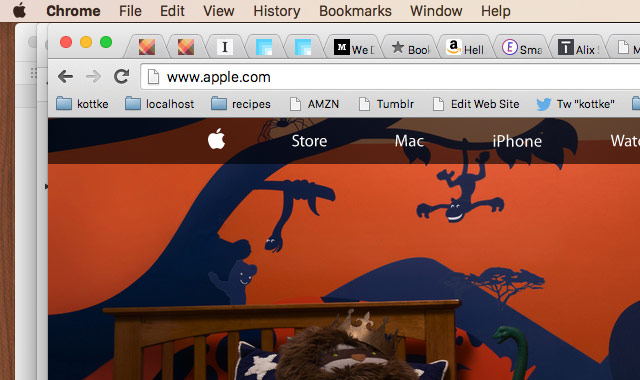
Pretty nice. But it’s not perfect. For instance, look at the text in the Chrome tabs…it’s not aligned correctly. And if you have the fast user switching menu enabled in the menu bar, that’s weirdly misaligned too. If you’d like, you can also switch back to using the previous font, Lucida Grande.
Hang on folks, things are going to get a little Apple bloggy around here this morning. First is the news of Apple’s new operating system for the Mac, OS X Mountain Lion. Gruber has the details:
What do I think so far, Schiller asks. It all seems rather obvious now that I’ve seen it - and I mean obvious in a good way. I remain convinced that iCloud is exactly what Steve Jobs said it was: the cornerstone of everything Apple does for the next decade. So of course it makes sense to bring iCloud to the Mac in a big way. Simplified document storage, iMessage, Notification Center, synced Notes and Reminders — all of these things are part of iCloud. It’s all a step toward making your Mac just another device managed in your iCloud account. Look at your iPad and think about the features it has that would work well, for a lot of people, if they were on the Mac. That’s Mountain Lion — and probably a good way to predict the future of the continuing parallel evolution of iOS and OS X.
And as usual, the definitive review of any new version of OS X is John Siracusa’s for Ars Technica. This time around, it runs 19 pages. If that’s not to your liking, you can just download Lion right now from the Mac App Store for $30.
Two other misc Apple thoughts: 1) They appear to have discontinued the MacBook. There are Airs and Pros but no plain-old MacBooks. 2) Apple Inc, already among the largest companies in the world in terms of market cap, announced yesterday that the company’s “revenue [is] up 82 percent and profits [are] up 125 percent” over the same quarter last year. That level of growth in such a big company…that’s just astounding. And much of the revenue and profit are from products that didn’t exist even five years ago…the iPad alone was a ~$5 billion business in Q3 (for comparison, Google had $9 billion in total revenues in Q2). If that’s not unprecedented, it’s damn close.
What the hell do all those shortcut symbols in OS X application menus (⌘, ⌥, ⇧) mean anyway?
I have to think (and experiment) every single time I want to decipher one of these keyboard “shortcuts”. Why is it that only the command key (⌘) actually has the symbol printed on the key itself? And what’s up with the symbol for the option key (⌥)?
Put ‘em on the keyboard, Apple.
I recently upgraded to a new MacBook Pro from a two-year-old version of the same model (more or less). It’s sturdier, faster, has a more functional trackpad, and has a much larger hard drive than the previous model, making it well worth the ~$2700 purchase price because I use my computer for more hours in a year than I sleep. Three weeks ago, my first-generation iPhone broke and rather than pay for a straight-up replacement, I upgraded to a new iPhone 3G (and promised AT&T my spare kidney in the process). Again, totally worth it…the speed and video camera alone were worth the upgrade. On Monday, I upgraded the OS on my MBP to OS X 10.5 Service Pack 1 Snow Leopard. Not sure whether it was worth it at this point or not, but it was only $29 and promised much.
The upgrade process in each case was painless. To set up the MBP, I just connected it to my Time Machine drive and was up and running about an hour later with all my apps and preferences intact. The iPhone took even less time than that and everything from my old phone was magically there. Snow Leopard took 45 minutes and, aside from a couple of Mail.app and Safari plug-ins I use, everything was just as before.1 Past upgrades of Apple computers and iPods have gone similarly well.
Which is where the potential difficulty for Apple comes in. From a superficial perspective, my old MBP and new MBP felt exactly the same…same OS, same desktop wallpaper, same Dock, all my same files in their same folders, etc. Same deal with the iPhone except moreso…the iPhone is almost entirely software and that was nearly identical. And re: Snow Leopard, I haven’t noticed any changes at all aside from the aforementioned absent plug-ins.
So, just having paid thousands of dollars for new hardware and software, I have what feels like my same old stuff.
Deep down, when I stop to think about it, I know (or have otherwise convinced myself) that these purchases were worth it and that Apple’s ease of upgrade works almost exactly how it should. But my gut tells me that I’ve been ripped off. The “newness” cognitive jolt humans get is almost entirely absent. I don’t know if Apple is aware of this (I’d guess yes) and don’t know if it even matters to them (because, like I said, this is the way that it should work…and look at those sales figures), but it’s got to be having some small effect. People want to feel, emotionally speaking, that their money is well-spent and impeccable branding, funny commericals, and the sense of belonging to a hip lifestyle that Apple tries to engender in its customers can only go so far. [Apple Tablet, this is your cue.]
[1] Merlin Mann’s upgrade did not go well. Not only did Merlin not get the “newness” cognitive jolt, his new stuff worked worse than his old stuff. Although, Merlin, upgrading five (five!) computers while “writing a book on deadline” probably wasn’t the best idea. ↩
The next version of OS X (code named Snow Leopard) is available for pre-order at Amazon…for only $29 for Leopard (10.5) users. The family pack for five users is only $49. If you’re upgrading from an older version of OS X, the Mac Box Set for $169 is your best bet. (via daringfireball)
Has anyone else noticed that Mail.app and IMAP aren’t perfect playmates in Leopard? The unread counts in my folders don’t update until I click on them (and my inbox unread count never updates), which is suboptimal and time consuming in the extreme.
Two bits (bites? har har) of Apple news:
1. Steve Jobs has announced that an SDK will be available for the iPhone and iPod touch in February. No more hacking your phone to put applications on it.
2. You can now preorder OS X 10.5 (Leopard) at Amazon for $109…that’s $20 off the retail price. The offer comes with a pre-order price guarantee; if the price drops before it ships, you get it for the lower price.
Speaking of Weegee, I stumbled across some photos he made based on his well-known portrait of Marilyn Monroe.

He created the funhouse photos by manipulating negatives and distorting the light falling on the photographic paper from the enlarger. They remind me of images captured by OS X’s Photo Booth with the distortion filters on.

(Photo credits, L to R: Blueberry Pony, Spullara, Winstonavich, Thelastminute, Mysistersabarista)
Panic has released Coda, a new web development app for OS X. Panic co-founder Cabel Sasser describes it thusly:
We build websites by hand, with code, and we’ve long since dreamed of streamlining the experience, bringing together all of the tools that we needed into a single, elegant window. While you can certainly pair up your favorite text editor with Transmit today, and then maybe have Safari open for previews, and maybe use Terminal for running queries directly or a CSS editor for editing your style sheets, we dreamed of a place where all of that can happen in one place.
Ever since I switched to a Mac, I’ve been seeking a suitable replacement/upgrade for Homesite. I limped along unsatisfied with BBEdit and am finally getting into the groove with TextMate, but the inter-app switching — especially between the editor, FTP client, and the terminal — was really getting me down. John Gruber has a nice preview/review of Coda:
Each of Coda’s components offers decidedly fewer features than the leading standalone apps dedicated to those tasks. (With the possible exception of the terminal - I mean, come on, it’s a terminal.) This isn’t a dirty secret, or the unfortunate downside of Coda only being a 1.0. Surely Coda will sprout many new features in the future, but it’s never going to pursue any of these individual apps in terms of feature parity.
The appeal of Coda cannot be expressed solely by any comparison of features. The point is not what it does, but it how it feels to use it. The essential aspects of Coda aren’t features in its components, but rather the connections between components.
Panic’s implicit argument with Coda is that there are limits to the experience of using a collection of separate apps; that they can offer a better experience - at least in certain regards - by writing a meta app comprising separate components than they could even by writing their own entire suite of standalone web apps. Ignore, for the moment, the time and resource limitations of a small company such as Panic, and imagine a Panic text editor app, a Panic CSS editor app, a Panic web browser, a Panic file transfer/file browser app - add them all together and you’d wind up with more features, but you’d miss the entire point.
Panic co-founders Steven Frank and Cabel Sasser both weigh in on the launch. Has anyone given Coda a shot yet? How do you find it? I’m hoping to find some time later today to check it out and will attempt to report back.
Citing the resource-hungry iPhone as the culprit, Apple announced that they’ve pushed back the launch date for the new version of OS X (codename: Leopard) from June to October. “iPhone contains the most sophisticated software ever shipped on a mobile device, and finishing it on time has not come without a price — we had to borrow some key software engineering and QA resources from our Mac OS X team.”
Steven Johnson, new Apple rumors blogger, reads the tea leaves and surmises that Apple will soon release multitouch displays to go with Leopard and a new version of iLife.
The iPhone runs on OS X, right? So theoretically, shouldn’t you be able to run IE for Windows XP in Parallels?

Older posts





Socials & More